Showing posts with label Python. Show all posts

Wednesday, July 24, 2013

SIGGRAPH 2013 & Alembic 1.5

ILM sent me down to SIGGRAPH this year in Anaheim since I've been one of the software developers on the Alembic project.

Practical Acceleration of Alembic
Birds of a Feather
WEDNESDAY, JULY 24, 2013 - 11:00AM TO 12:00PM

For SIGGRAPH, we released Alembic 1.5, with the new faster Ogawa backend. For my part, I got to speak a bit about some of the tools I've been working on for Alembic:


AbcView is a graphical PyQt-based Alembic inspection and visualization tool. It offers a number of widgets to help you inspect and visualize your Alembic data, as well as assemble hierarchical scenes.

Sunday, January 6, 2013

Utter

Looking for a basic text-to-speech (tts) Python module with language conversion and mp3 playback and comes with a Heroku web app? Try utter, https://github.com/rsgalloway/utter.
% pip install utter
It's super easy to use from the command line:
% utter "this is a test"
and to convert to, say, German:
% utter "I am a Berliner" -t de
The Python API is just a easy to use:
>>> import utter
>>> utter.play("I love utter", target="ja")
The only requirement for translation is that you have a Google API Key, which you can get from the Google APIs Console.

I've also written a simple Instapaper Python API, that when combined with utter, you can use to read saved articles back to you, for example on your commute or a road trip. You can even have it translated to another language if you want, for example Italian:
>>> import utter
>>> for m in marks:
...     utter.play(m.text, target="it")
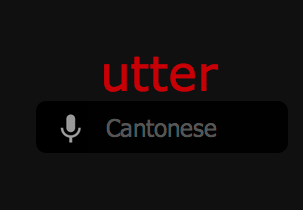
Utter also comes with a "web" branch that's ready to deploy to heroku. The nice thing about the web app is that it takes advantage of the built-in speach-to-text feature of Chrome, so you can get automatic spoken language translation on the fly. Just click on the language menu to choose the target language, then click the mic to start.


You can play with it here: http://utter.herokuapp.com. Sorry, Chrome only, and I've capped the language translation at 2M characters per day.

Disfrute!

Sunday, August 5, 2012

PySeq 0.3.0


Finally released a new version of PySeq, the open-source compressed sequence string module for Python. The biggest change here is that it fixes issue #1, where same-named sequences but with different extensions were not being compressed, e.g.
% lss tests/fileA.*
   3 fileA.%04d.jpg 1-3
   3 fileA.%04d.png 1-3
Change log:
+v0.3.0 - 2012 Aug 05
  + fixed %R in uncompress()
  + fixed minor bug in getSequences() with glob
  + fixed issue #1: same seqs with different extensions don't compress
  + added some simple inline unit tests
Thanks to Erkan Ozgur Yilmaz for the %R directive fix in uncompress.

Thursday, April 28, 2011

QRangeSlider for PyQt

PyQt is lacking a range slider, or double-handled slider, and I didn't like the ones I found out there, so I implemented this simple one in Python and made it available on GitHub.

Installation:
$ sudo easy_install qrangeslider
Documentation:

Monday, March 14, 2011

PySeq 0.2.0b

Changelog:
  • Added support for wildcards in source input
  • Added format method to Sequence class for formatted string stdout
  • Printing a Sequence instance now returns a simplified compressed sequence string
  • Added SequenceError exception for non-sequence exceptions
  • Sequence append method raises SequenceError for non-sequence members
  • Export diff function to get numeric differences between two sequential files
  • Alpha version of uncompress func for expansion of compressed sequence strings
  • Added additional attributes to Item class: path, frame, head, tail
  • Item name attribute is now base name, fixes bug with file paths as names
  • Moved function main() to lss permanently
  • Added --format and --debug options to lss
  • Ability to set log level with environment variable $PYSEQ_LOG_LEVEL
  • Simplified format directives, e.g. from %(head)s to %h, with support for padding, e.g. %04l
  • Fixed duplicate sequence index number bug
  • Added 32 additional sequence file test cases
  • Performance improvements
  • Documentation improvements
Home page:
http://rsgalloway.github.com/pyseq/
PySeq’s git repo is available on GitHub, which can be browsed at:
https://github.com/rsgalloway/pyseq
and cloned using:
$ git clone git://github.com/rsgalloway/pyseq.git pyseq
Installing PySeq is easily done using setuptools. Assuming it is installed, just run the following from the command-line:
$ easy_install pyseq
Alternatively, you can install from the distribution using the setup.py script:
$ python setup.py install